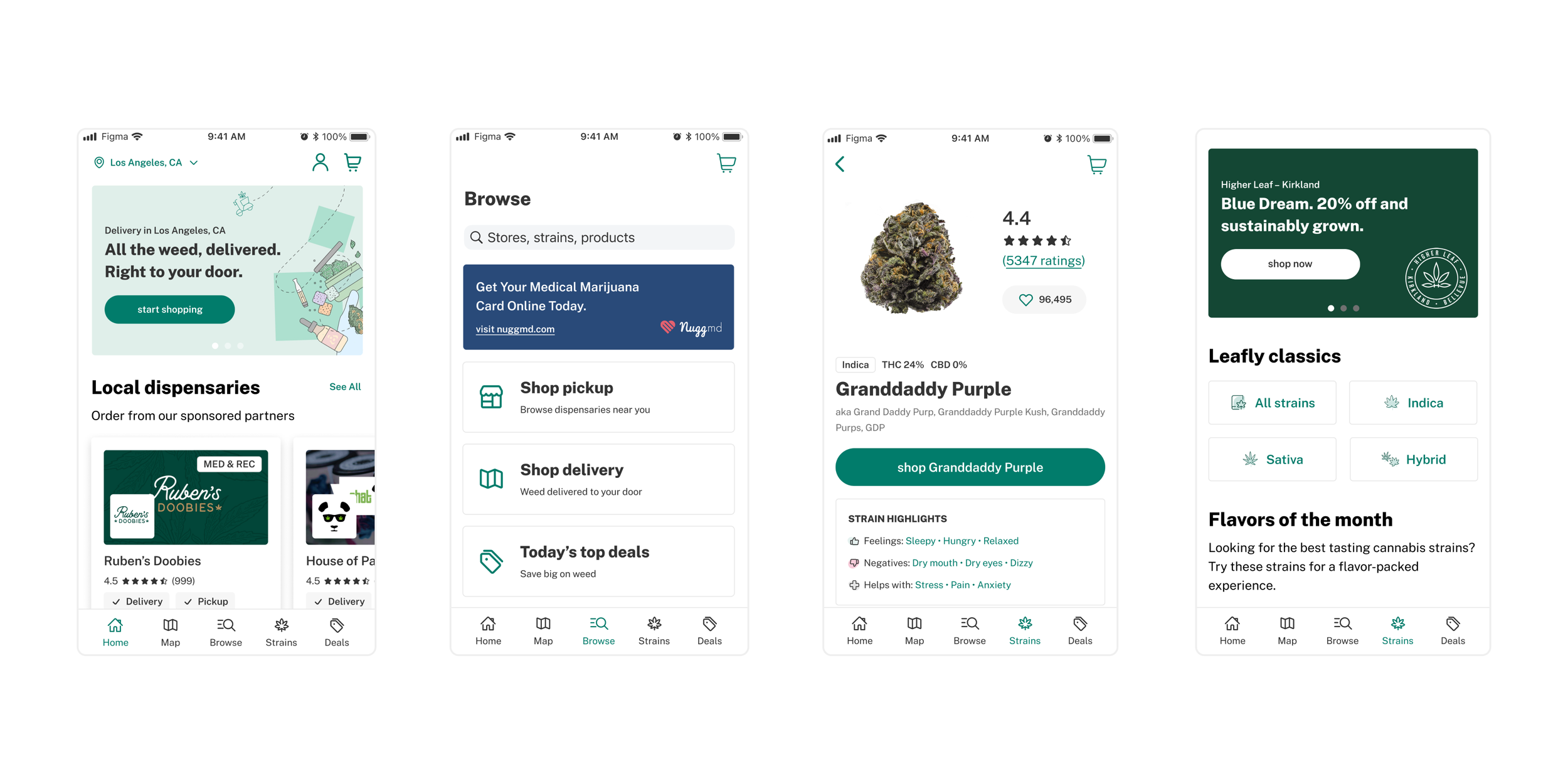
Redesigning Leafly’s native apps to achieve parity with web, align with OS guidelines, and deliver a more accessible, intuitive experience for millions of users, boosted checkout activity, and increased app store rating across platforms.


Overview
Leafly is the world’s most trusted destination to discover cannabis products and order them from licensed retailers. Over 100 million users visit annually to learn about cannabis and shop from local dispensaries.
When I joined Leafly in Fall 2021, the native apps were outdated, inconsistent with the web experience, and not aligned with Apple or Material Design guidelines. The design team was extremely lean — I joined as the sole Product Designer on the native team, alongside an Engineering Manager and iOS Developer.
My Role: As Senior Product Designer, I led a full audit and redesign of the Leafly native apps, focusing on:
Identifying usability issues and outdated patterns
Establishing parity between web and mobile experiences
Aligning both apps with iOS and Android design standards
Improving accessibility, consistency, and scalability
Defining release phases and collaborating on testing plans
Tools: Figma, FigJam, Baymard, Mobbin, Jira
The Challenge:
"Our native apps are not in parity with our web experience and do not conform to OS guidelines.”
The apps had accumulated design debt from years of incremental updates. Outdated navigation, inconsistent patterns, and low accessibility contrast all contributed to usability issues and fragmented user journeys.

Process
1. Native Audit
I began by conducting an in-depth audit to evaluate how our apps aligned with Apple Human Interface Guidelines and Material Design Guidelines. Using FigJam, I documented all areas of nonconformance — grouping findings into categories such as Navigation, Interactions, and Search.
Collaborating with Design Management and stakeholders, we prioritized the highest-impact areas and agreed to focus first on navigation and search, which were core to user engagement.


2. Navigation Redesign
Findings:
Inconsistent navigation between Android and iOS
Outdated sidebar menus with ungrouped, cluttered items
Poor contrast ratios, failing ADA accessibility requirements
Solution:
Introduced a bottom navigation following OS best practices
Consolidated key actions (e.g., Bag, Account) into clearer categories
Removed redundant “More” menu and streamlined IA
Updated tab colors to meet WCAG contrast standards, improving legibility and accessibility
These changes modernized the app experience and improved task efficiency across both platforms.
3. Search → Browse Redesign
Search was the most-tapped feature in the app but lacked depth and personalization.
Pain Points:
No recent search history
Limited predictive text or categorization
Generic results
Solutions:
Renamed the feature to “Browse” to better reflect discovery behavior
Added recent search history, predictive text, and category-based suggestions
Designed for personalization: tailored content by user history, seasonality, and promotions
Created opportunities for sponsored content and SEO-based merchandising
This improved discoverability, supported Leafly’s revenue goals, and strengthened alignment between native and web experiences.
Final Designs


Visit Leafly App Store
Outcomes
Increased app downloads and checkout activity following redesign
Improved accessibility and parity across iOS, Android, and Web
Increased app store ratings from 4.5 to 4.8 ★ average rating on the App Store and from 4.5 to 4.7 on Google Play
Established foundation for scalable design system integration
Next Steps: Several usability and navigation updates are currently in development, with additional releases planned for Q3 2023, including expanded search personalization and enhanced product filtering.
Key Takeaways:
A strong audit can unlock alignment across platforms and teams
Accessibility and OS parity are crucial for long-term design scalability
Collaboration between UX, engineering, and SEO can drive both usability and business growth